Yugioh Card Maker
AppTeccComics
4.021.00 Reviews
- Version
- 2.0.0
- Installs
- 50.00K
- Age Rating
- Everyone
Screenshots
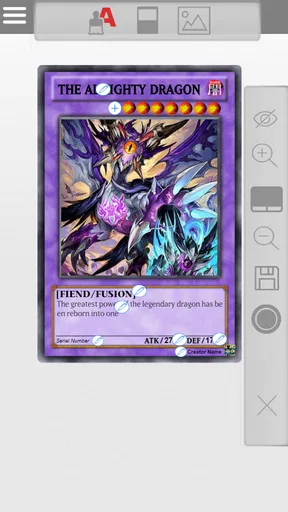
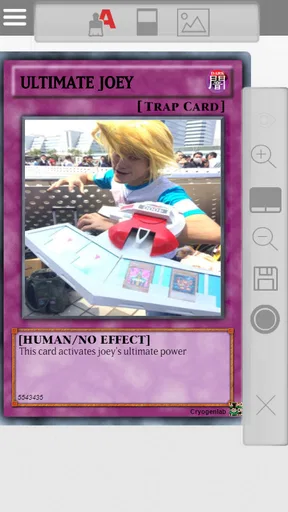
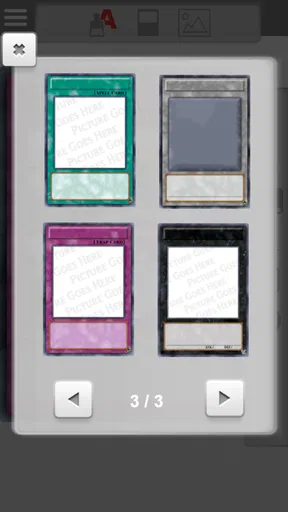
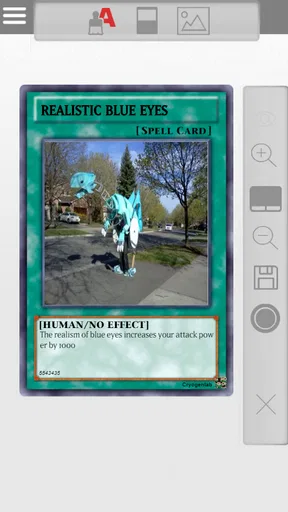
Our Review of Yugioh Card Maker
 Analysis by Appyee
If you enjoy making custom trading cards, Yugioh Card Maker gives you a simple way to turn an idea into a card-style image without opening a full graphics editor. I found it most appealing as a casual creative tool: you can sketch out a funny card for a friend, build a character concept, or make a meme that looks closer to a collectible card than an ordinary picture. It is not a complete card game and it is not trying to replace professional design software. Its value is the quick path from a blank concept to something shareable.
This free Comics app comes from AppTecc and is aimed at Everyone, so its basic appeal is easy to understand even if you have never designed a custom card before. The app has an average rating of 4.0 from over 500 ratings, with more than 50K installs, which suggests that it has found a modest audience among fans who want a lightweight card-making experience. I would recommend approaching it as a playful editor rather than as an official Yugioh companion.
What to expect before creating your first card
The central idea is straightforward: choose the kind of card concept you want to make, add your own text and visual material, and shape it into a recognizable Yugioh-inspired format. That makes it useful for several different situations. You might create a deliberately absurd card for a group chat, prepare a homemade character card for a tabletop session, or test how a story idea feels when presented with a name, image, description, and card identity.
What makes the app different from a general meme editor is the framing. In a normal image editor, you begin with a blank canvas and have to build the visual hierarchy yourself. Here, the card format gives your joke or concept an immediate structure. That saves time, especially when the goal is not polished graphic design but a result that feels recognizable at a glance.
At the same time, I would keep expectations realistic. The app is best for personal creations, humorous designs, and quick experiments. If you need precise typography, layered artwork, advanced masking, or a carefully controlled print layout, a dedicated graphics application will give you more control. The trade-off is that such tools also require more setup. This editor is attractive precisely because it keeps the creative task closer to filling in an idea than constructing a design system from scratch.
The free download makes it easy to try without committing money at the start. Some items are offered through in-app purchases priced at $2.49 per item, so I would check what is available before building a workflow around paid material. The important distinction is between wanting to make an occasional card and wanting a large collection of reusable design resources. For the first use case, the app is easier to justify; for the second, the individual purchase model may deserve more thought.
Installing it and getting oriented
The app was released on January 21, 2020, and the current version is 2.0.0. It requires Android 7.0 or later. After installation, my advice is to begin with a small idea rather than trying to reproduce a famous card perfectly. A short joke, a fictional pet, or an exaggerated everyday object is enough. Starting small lets you learn the editor’s rhythm without becoming frustrated by details before you understand where everything belongs.
Before typing, decide what the card is supposed to communicate in one sentence. For example, “This is a card about my friend who always loses their keys” is more useful than simply opening the editor and adding random text. That single sentence helps you choose a name, an image, and a description that support the same joke. The result usually feels more intentional, even when the card is meant to be silly.
I also recommend preparing the main image first. A clear subject with a strong outline generally works better than a busy photograph, because the card layout has limited visual space. If you use an image with several small details, those details may become difficult to read once they are placed inside the card. A simple crop with one obvious focal point is often more effective than a technically better but crowded picture.
For a first attempt, resist the temptation to fill every possible text area with a long explanation. Card-style designs work because the reader can understand the main idea quickly. Write the title first, then add only the description needed to land the joke or explain the concept. If the card is based on a personal reference, one specific detail is usually funnier than a paragraph explaining the entire story.
The quickest route to a meaningful first result
My preferred first-session workflow is to create a deliberately simple card in three passes. First, decide on the identity: what is the card called, and what kind of personality or function should it suggest? Second, choose an image that supports that identity instead of competing with it. Third, add the shortest wording that makes the idea understandable to someone who was not present when you invented it.
This approach produces a meaningful result faster than experimenting with every control. It also gives you a useful test of whether the app suits you. If a basic card already feels enjoyable, you can return to refine the layout and explore more options. If the process feels restrictive even with a simple concept, you will know early that a general-purpose editor may be a better match.
A realistic everyday use is a birthday or group-chat joke. Imagine a friend who is always late. I would make a card with a playful name, use a recognizable but uncluttered image, and write a short effect-style line describing the inevitable delay. The card does not need to function in a real duel. Its success comes from being instantly recognizable and easy to send as an image. That is where the app’s focused format is more convenient than assembling the same joke manually in a blank design tool.
Another useful workflow is character planning. If you are writing a comic, fan story, or small game concept, a card can act as a compact character profile. The image establishes the visual hook, while the card text forces you to summarize the character’s identity and signature ability. This limitation is productive: it can reveal whether your idea has a clear core or needs more development.
The best first success is not a technically elaborate card; it is a card whose joke or concept is understandable in a few seconds. Once that works, visual experimentation becomes much more rewarding because you are improving a clear idea rather than decorating an empty template.
Where new users may become confused
The biggest source of confusion is the difference between a card maker and a game tool. A custom card may look like something that belongs in a duel, but creating an image does not automatically make it compatible with official cards, official rules, or tournament play. I would treat every result as fan-made artwork unless you are using it purely as a private prop for your own informal activity.
Names and terminology can also create expectations. Because the app is built around the visual language of Yugioh cards, users may assume that every field has a strict gameplay meaning. For a joke card, you can be imaginative. For a serious custom-card project, however, consistency matters. Decide what each text area is meant to communicate before filling it, and avoid adding official-looking claims that could make the card confusing when shared outside your friend group.
Image choice is another common stumbling block. A picture that looks good in a phone gallery may not work well inside a card frame. Subjects near the edge can feel cramped, while dark images may lose separation from surrounding design elements. I found it more efficient to try a few deliberately different images than to spend a long time adjusting one that was fundamentally unsuitable.
Text length deserves similar care. Long wording may be technically amusing but visually tiring. If your idea needs a full explanation, consider making the card’s main text a punchline and placing the background story in the message where you share it. This keeps the image readable and lets the recipient enjoy the card immediately.
There is also a practical difference between making one card and making a series. A single card can be improvised. A set needs rules: similar naming, consistent tone, and a repeatable image style. Before making several cards, write down a tiny style guide for yourself. Decide whether the set will be serious, absurd, or mixed; choose a common approach to titles; and keep the descriptions roughly similar in length. The app can help you produce individual cards, but the coherence of a collection depends mainly on your own process.
How it compares with ordinary alternatives
Compared with a general image editor, this app is faster for the specific task of making a Yugioh-style card. You do not have to recreate the overall arrangement every time, and the format itself encourages you to think in terms of a title, image, and concise card text. That is a real advantage for beginners who want a result rather than a lesson in graphic design.
Compared with a meme generator, it offers a more distinctive presentation. A regular meme usually depends on a large image and a short caption. A card can make the same joke feel like an object with a fictional identity and purpose. That extra structure is particularly useful for inside jokes, character concepts, and themed sets.
Compared with professional design software, the advantage shifts toward convenience while control becomes the compromise. An advanced editor is better when you need exact spacing, custom fonts, complex image treatment, or a print-ready composition. It is also better for someone who already knows how to work with layers and wants total freedom. I would choose this app when speed and theme matter more than precision.
It also differs from an official card database or companion application. Those tools are meant for discovering, organizing, or interacting with existing cards. This one is for inventing your own visual concepts. If your goal is to check official card text, build a legal deck, or manage a collection, you should look elsewhere. If your goal is to make a fictional card for a friend, the focused editor is much closer to what you need.
Ways to get better results without making the process harder
One useful technique is to separate the “funny idea” from the “card wording.” Write the joke in ordinary language first, then translate it into a compact card-style sentence. This prevents the design from becoming a transcript of your original thought. It also helps you notice which detail is actually funny and which details are only background information.
A second technique is to design for the person who will receive the card, not only for yourself. Personal references can be delightful, but they can also become unreadable to everyone else. Include one visible clue that explains the theme. If the card is about a friend’s coffee habit, for instance, make the title or image communicate that immediately instead of relying entirely on an inside story.
A third insight is that limitations can make a set feel more professional. Use the same kind of image treatment across several cards, keep titles similarly shaped, and avoid changing the tone from one card to the next unless the contrast is intentional. Even without advanced editing controls, consistency creates the impression of a designed collection rather than unrelated experiments.
For sharing, inspect the finished card at the size your friends are likely to see it. If the important text is difficult to read on a phone, shorten it. If the central image is unclear in a small preview, simplify the composition. Designing for the final viewing situation is more useful than judging the card only while zoomed in during editing.
Finally, save your original ideas outside the app as well. Keep a short note containing the card name, the intended joke, and the image concept. That makes revisions easier and protects you from having to reconstruct a good idea from memory. It is especially helpful if you are developing a themed group of cards over several sessions.
Who should use it and who should skip it
I think this is a good fit for fans who want quick fan-made artwork, people who enjoy making personalized jokes, and beginners who find a blank canvas intimidating. It is also useful for writers and hobby creators who want a compact way to visualize characters or fictional abilities. The low barrier to entry means you can test an idea during a short break instead of planning a full design session.
I would be more cautious about recommending it to someone who wants to print a polished deck, publish commercial artwork, or reproduce official card layouts with exact technical control. A dedicated graphics workflow will be more suitable for those goals. The same applies to users who are primarily looking for card rules, deck building, collection management, or an actual digital duel experience. This app’s purpose is creation, not competitive play.
Parents may also appreciate that the listed content rating is Everyone, but I would still view each custom creation individually before sharing it with younger children. The tool can be used for harmless jokes, yet the tone depends on what the creator writes and uploads. The age rating describes the app’s intended general audience, not every possible card someone might make with it.
My recommendation after using the workflow
For a first-time user, I would install it with one clear goal: make one card that communicates a single idea. Choose a simple image, keep the wording short, and judge the result by whether another person understands it quickly. That process gives you a reliable introduction without making the editor feel more complicated than it needs to be.
After that first card, decide whether you want to explore humor, character design, or a small themed collection. Each direction benefits from a slightly different approach, but all of them reward restraint. The strongest results are usually not the ones with the most text or the busiest picture; they are the ones where the name, image, and description work together.
My overall opinion is positive, with a clear boundary around what the app is for. AppTecc has made a focused tool for custom Yugioh-style card images, and its free entry point makes experimentation approachable. The $2.49 per-item purchases are worth considering if you want extra material, but they do not change the central question: do you enjoy turning ideas into card-shaped creations?
If the answer is yes, this is an easy app to recommend to a friend who wants a quick creative project or a memorable joke for a group chat. If you need official card functionality, advanced design control, or print production, choose a more specialized alternative instead. For casual fan creativity, though, it offers a satisfying path from a rough idea to a finished card without demanding professional design skills.
Verdict
Strengths of Yugioh Card Maker
- Easy-to-use tools for creating custom Yu-Gi-Oh!-style cards.
- Supports personalized artwork, names, effects, and card attributes.
- Useful for fan projects, proxies, and casual custom card concepts.
- Quickly preview your design before saving or sharing it.
- Encourages creativity without requiring advanced design skills.
Limitations of Yugioh Card Maker
- Custom cards may not follow official game balance or tournament rules.
- Some features or templates may require an internet connection.
- Export quality can vary depending on the chosen artwork and device.
- Created cards have no official value in the Yu-Gi-Oh! card game.
- Sharing options may be limited compared with dedicated design platforms.
Similar Picks in This Category
View All
WEBTOON: Manga, Comics, Manhwa
NAVER WEBTOON4.6

MangaToon: Comic & Manga
MangaToon4.3

네이버 웹툰 - Naver Webtoon
NAVER WEBTOON4.3

Tapas – Comics and Novels
Tapas Entertainment Inc.4.2

Lezhin Comics - Daily Releases
LEZHIN ENTERTAINMENT3.3

WebComics - Webtoon & Manga
WEBCOMICS HOLDINGS HK LIMITED4.4
Frequently Asked Questions
What is Yu-Gi-Oh! Card Maker, and what can I do with it?
Yu-Gi-Oh! Card Maker is a fan-oriented card creation tool that lets you design custom cards inspired by the Yu-Gi-Oh! trading card game. You can usually add a card name, artwork, type, attribute, level, effect text, attack, and defense values, then preview the result. It is mainly intended for creative projects, casual play, storytelling, and sharing original designs with friends.
Can cards created with Yu-Gi-Oh! Card Maker be used in official tournaments?
No. Cards produced with Yu-Gi-Oh! Card Maker are unofficial creations and are not recognized as legal cards for official Yu-Gi-Oh! tournaments, sanctioned events, or competitive online platforms. They are best used for entertainment, testing ideas, role-playing, custom formats, or displaying your creativity. Always use officially released cards when participating in organized play or trading with other players.
Is Yu-Gi-Oh! Card Maker free to download and use?
Availability and pricing can vary depending on the version, platform, and publisher. Some versions may be free with optional advertising, while others can include paid features, restrictions, or separate download conditions. Before installing, check the official store listing carefully for in-app purchases, subscription details, advertising, supported devices, and the developer’s identity so you understand what is included.
Does Yu-Gi-Oh! Card Maker require an internet connection?
The basic card-design process may work without a constant internet connection, particularly if the application already includes its templates and editing tools. However, internet access may be needed for downloading images, saving or sharing cards online, displaying advertisements, synchronizing projects, or accessing updated content. Requirements can differ between versions, so review the app listing and test offline features after installation.
Is Yu-Gi-Oh! Card Maker safe and suitable for children?
Safety depends on where you download the application and how the sharing features are used. Install it only from a trusted official store, review requested permissions, and avoid unofficial modified files. If the app allows public image uploads or social sharing, children should use it with supervision because user-generated content may not be moderated consistently. Parents should also check age ratings and privacy policies.
